deviant art

Deviant Login Shop  Join deviantART for FREE Take the Tour
[x]
more ▶

More from =Kishan-Bagaria

Featured in Groups:

Details

July 27, 2012
218 bytes
Sta.sh
Link
Thumb

Statistics

Comments: 16
Favourites: 45 [who?]

Views: 5,202 (1 today)

License

Creative Commons License
Some rights reserved. This work is licensed under a
Creative Commons Attribution-Noncommercial-No Derivative Works 3.0 License.
[x]
:iconkishan-bagaria:

Download Link


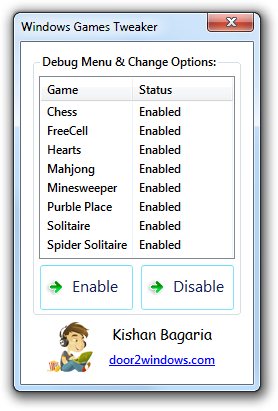
Windows Games Tweaker is a freeware from door2windows that allows you to enable a secret debug menu and add quick access to change appearance options in Windows 7/Vista games.

How To Use:


  1. Run the tool.

  2. Select the games in which you want to enable the extra options.

  3. Click Enable.

  4. Restart your PC. Now the games you had selected will contain extra menus.


Thanks to AskVG for discovering the tweak.
Add a Comment:
 

The Artist has requested Critique on this Artwork

Please sign up or login to post a critique.

:icon4hellcat:
~4hellcat Jul 27, 2012  Hobbyist General Artist
fantastic app thanks for share :)
(but I do not play :D )
Reply
:iconwindows-fan:
~Windows-Fan Jul 27, 2012  Professional Interface Designer
thnx for providing credits and source link. thats what a good software developer should do.

nice work and thnx for sharing it here. :)
Reply
:iconizzuthug:
So much easier than having to dig through settings to enable them. Thank you.
Reply
Hidden by Owner
Hidden by Owner
Hidden by Owner
Hidden by Owner
:iconspringsts:
"Windows 8 is not supported" :D
Reply
:iconkishan-bagaria:
Windows 8 doesn't have those games unfortunately. :)
Reply
:iconlonmcgregor:
woah! hold up. my computer dosen't have "purble palace" and that is causing the application to crash. screenshot; [link]
Reply
Add a Comment: